# XB24 modem firmware update crash
**URL:** https://forums.digi.com/t/xb24-modem-firmware-update-crash/1967
**Category:** XBee - 802.15.4
**Created:** [February 28, 2008, 9:25am UTC](https://forums.digi.com/t/xb24-modem-firmware-update-crash/1967 "2008-02-28T09:25:24Z")
**Posts on this page:** 13
**Page:** 1
### Author:  [@foppafra](https://forums.digi.com/u/foppafra)
#### Post date: [February 28, 2008, 9:25am UTC](https://forums.digi.com/t/xb24-modem-firmware-update-crash/1967/1 "2008-02-28T09:25:24Z")
Using the evaluation board XBIB-R-DEV board I tried to update the FW of a XBEE 24-ACI-001 modem with teh X-CTU software.
the procedure start well, but at the end the communication stop and the module continue to reset (the RESET pin continue to go down)
…
someone has an idea why?
and to recover the modem?
dAN
---
### Author:  [@QATQET](https://forums.digi.com/u/QATQET)
#### Post date: [March 27, 2008, 12:45am UTC](https://forums.digi.com/t/xb24-modem-firmware-update-crash/1967/2 "2008-03-27T00:45:59Z")
I have the same error, does any body knows how to solve it, please? If I found the solution i post it. Thanks. 🙂
---
### Author:  [@QATQET](https://forums.digi.com/u/QATQET)
#### Post date: [March 27, 2008, 12:58am UTC](https://forums.digi.com/t/xb24-modem-firmware-update-crash/1967/3 "2008-03-27T00:58:17Z")
Hi again, I found a solution, i just download the most recent version of x-ctu (5.1.0.0 in this moment) and the problem goes out!
---
### Author:  [@Kaneda](https://forums.digi.com/u/Kaneda)
#### Post date: [August 12, 2008, 8:20am UTC](https://forums.digi.com/t/xb24-modem-firmware-update-crash/1967/4 "2008-08-12T08:20:57Z")
Same happening here but just with 3 recently acquired modules. Other modules bought 1 year ago don’t suffer that issue.
I already downloaded X-CTU 5.1.4.1 but there seems to be no way of bringing back the ‘fried’ modules.
Anyone has any idea on recovering/debricking this units?
Thanks in advance.
---
### Author:  [@Admin1](https://forums.digi.com/u/Admin1)
#### Post date: [August 12, 2008, 2:24pm UTC](https://forums.digi.com/t/xb24-modem-firmware-update-crash/1967/5 "2008-08-12T14:24:09Z")
This would be a good issue to contact Technical Support about, in particular regarding the three radios exhibiting this problem. We can than investigate the issue more thoroughly and determine the cause.
---
### Author:  [@DFB](https://forums.digi.com/u/DFB)
#### Post date: [August 17, 2008, 9:59am UTC](https://forums.digi.com/t/xb24-modem-firmware-update-crash/1967/6 "2008-08-17T09:59:06Z")
This problem is the same I’ve having right now, I had done firware update in eight modules a year ago, but now during an updating it stops for something and now the module is useless.
I’m really worried, because I don’t want to buy a new Xbee cause I’m afraid to have the same problem.
---
### Author:  [@Kaneda](https://forums.digi.com/u/Kaneda)
#### Post date: [August 18, 2008, 9:03am UTC](https://forums.digi.com/t/xb24-modem-firmware-update-crash/1967/7 "2008-08-18T09:03:20Z")
DFB: I finally solved the problem on most units. After opening a support case, some indications from the support team that don’t appear to be clear enough in the documentation, helped me solve the problem.
First of all check if the problem is caused by wrong firmware version as it was in my case. My newer modules are revision B, and according to the changelog:
[http://ftp1.digi.com/support/firmware/xbeexbeepro802\_15\_4firmwarerevisionhistory.htm](http://ftp1.digi.com/support/firmware/xbeexbeepro802_15_4firmwarerevisionhistory.htm)
there are a lot of versions that don’t work properly with that revision of modules. Silly me, I didn’t check that and upgraded the modules with the same firmware I did my previous ones.
Please try this:
-Download and install latest X-CTU from the downloads section.
-Power off your module.
-Put reset to ground, or activate reset switch in your test board.
-While powered off (yes!) start the update on the x-ctu and wait until it complains that a reset is needed.
-Power on your board, and after a few seconds, release reset.
-Update should start ‘normally’.
Hope this helps you.
In case don’t, contact technical support, they quite solved the problem for me.
---
### Author:  [@DFB](https://forums.digi.com/u/DFB)
#### Post date: [August 19, 2008, 12:03am UTC](https://forums.digi.com/t/xb24-modem-firmware-update-crash/1967/8 "2008-08-19T00:03:22Z")
I get my Xbee-PRO back !!!
Because I always have had modules RevA I didn`t notice that: “Firmware versions 10A0 through 10A4 cannot run on Rev-B modules”, so I made the mistake of trying to update the 10A4 version, so the Xbee turn useless.
I recover it just doing the steps suggest by Kaneda (thanks a lot!!!) and writting on the module compatible versions like 1084 and 10A5.
---
### Author:  [@Harshil](https://forums.digi.com/u/Harshil)
#### Post date: [October 27, 2009, 1:58pm UTC](https://forums.digi.com/t/xb24-modem-firmware-update-crash/1967/9 "2009-10-27T13:58:54Z")
Hello,
I am a new bee on Maxstream.
Where can i get knowledge on revA, revB and revC modules & its compatibilty with the firmware versions?
Also, please mail me d firmware version 10A0, if u have. Will 10A0 work fine with revA modules?
Pls reply soon,
Regds,
HS
([mail2harshil.shah@gmail.com](mailto:mail2harshil.shah@gmail.com))
---
### Author:  [@mvut](https://forums.digi.com/u/mvut)
#### Post date: [October 27, 2009, 6:48pm UTC](https://forums.digi.com/t/xb24-modem-firmware-update-crash/1967/10 "2009-10-27T18:48:23Z")
Harshll,
The bulk of the modules manufactured after 12/07 and all modules manufactured after Jun of 08 are rev B or above. These modules support firmware versions 1084, 10A5 and above.
Firmware version 10A0 was a beta version that is no longer available or supported and will not install on your new modules.
All older module will support all firmware versions.
---
### Author:  [@Intense](https://forums.digi.com/u/Intense)
#### Post date: [November 3, 2009, 10:49am UTC](https://forums.digi.com/t/xb24-modem-firmware-update-crash/1967/11 "2009-11-03T10:49:41Z")
Kaneda, you are a crack!!! )))) Thanks very much!!!
---
### Author:  [@Richelsdorfite](https://forums.digi.com/u/Richelsdorfite)
#### Post date: [June 4, 2010, 2:59pm UTC](https://forums.digi.com/t/xb24-modem-firmware-update-crash/1967/12 "2010-06-04T14:59:13Z")
Hello,
I have the same problem with my two Xbee.
The caracteristics of them are :
- Xbee XB24-AUI
- 802-15-4
- 001-rev B
I use one adafruit adapter ( [http://www.adafruit.com/index.php?main\_page=product\_info&cPath=29&products\_id=126&zenid=50a0e2b2d9ec4375c42ce270568895bb](http://www.adafruit.com/index.php?main_page=product_info&cPath=29&products_id=126&zenid=50a0e2b2d9ec4375c42ce270568895bb)) with an FTDI 3V3 cable ( [http://www.adafruit.com/index.php?main\_page=product\_info&cPath=33&products\_id=70&zenid=50a0e2b2d9ec4375c42ce270568895bb](http://www.adafruit.com/index.php?main_page=product_info&cPath=33&products_id=70&zenid=50a0e2b2d9ec4375c42ce270568895bb)) and the last X-CTU soft.
At the begining, the two Xbee worked well without any bug. I have upgraded them with firmware 10E6 with no problem after this upgrade.
Later, I rewind to them and try to read the firmware and : nothing
The two doesn’t answer to any line command or read and write.
The baud rate is 9800-8-N-1.
I try “Tobrew” setting with no success.
I also try with a Reset wiring Reset pin to Ground. ( [http://forums.digi.com/support/forum/printthread\_thread,243\_offset,0](http://forums.digi.com/support/forum/printthread_thread,243_offset,0))
Nothing !!!
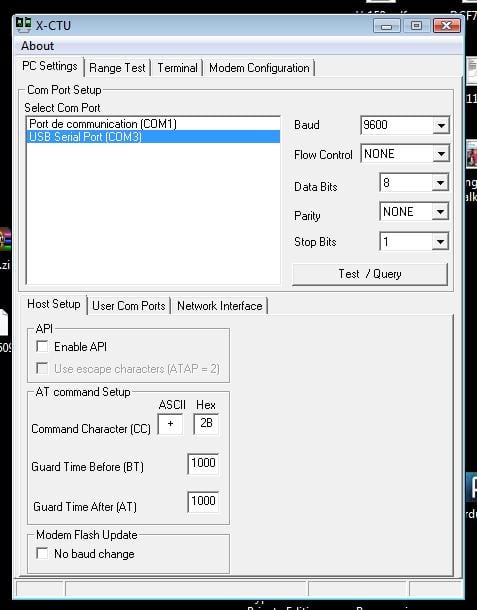
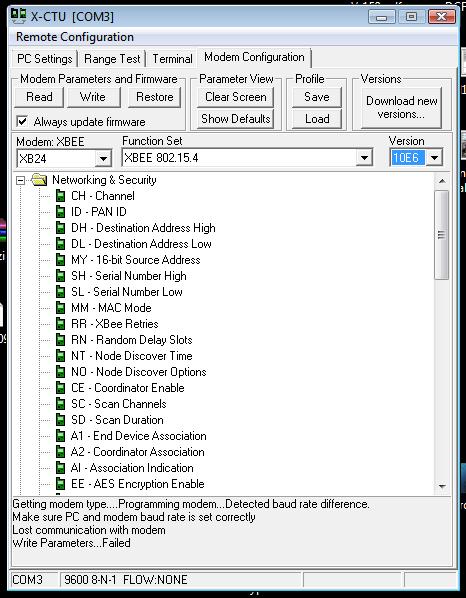
Here is two screen shoots of X-CTU software.
1. PC Setting
2. Modem Configuration
Do you have an idea ?
Thanks a lot,
Michel (From France)
---
### Author:  [@GE9Z](https://forums.digi.com/u/GE9Z)
#### Post date: [June 6, 2010, 7:41am UTC](https://forums.digi.com/t/xb24-modem-firmware-update-crash/1967/13 "2010-06-06T07:41:48Z")
[http://forums.digi.com/support/forum/viewthread\_thread,7663](http://forums.digi.com/support/forum/viewthread_thread,7663)
i have same issue, my thread is the above link
my 3 radios in question: xb24-awi-001-revb
did have fw: 10cd -\> 10e6
now none of them can i comm with using x-ctu